Create a Roster View with Position Numbers
To facilitate assignment transfers or reverse shift trades, create a Roster View that displays position ordinals as shown in the Organization section of the Setup area.
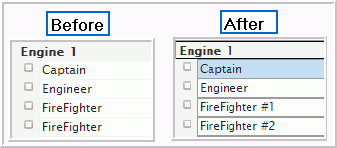
- Go to the Roster.
- Click the gear icon.
- Click Add Roster View
- Name this roster view.
- To show position numbers...
- Select Position Description in the Columns panel of the Display tab.
- Configure the remaining settings as desired. Recommended fields are checked by default.
- Click Save.